
In the fast-paced world of mobile applications, user expectations are higher than ever. An Android app that crashes, lags, or behaves unpredictably is likely to be uninstalled within minutes. That’s why testing is not just a phase in development—it’s a critical pillar that ensures your app performs flawlessly across devices, environments, and user scenarios.
To achieve high-quality performance and reliability, businesses increasingly rely on professional Android app testing and QA Asssurance that cover everything from functional validation to performance optimization. A structured testing strategy ensures your app meets industry standards and user expectations.
What Is Android App Testing?
Android app testing is the process of evaluating an application to identify bugs, performance issues, security vulnerabilities, and usability problems before it reaches end users. It involves multiple testing techniques and tools to ensure the app functions as intended.
| Aspect | Description |
|---|---|
| Functionality | Ensures all features work correctly |
| Performance | Checks speed, responsiveness, and stability |
| Security | Protects user data and prevents vulnerabilities |
| Usability | Ensures a smooth user experience |
Why Testing Is Essential for Android Apps

1. Prevents App Crashes
Crashes are one of the primary reasons users abandon apps. Testing helps identify and fix issues before release.
2. Ensures Cross-Device Compatibility
Android runs on thousands of devices with different screen sizes, hardware configurations, and OS versions. Testing ensures consistent performance across all devices.
3. Improves User Experience
A well-tested app provides smooth navigation, fast load times, and intuitive interactions.
4. Enhances Security
Testing helps detect vulnerabilities and ensures user data is protected.
5. Builds Brand Trust
High-quality apps lead to positive reviews, better ratings, and increased user retention.
Types of Android App Testing

Functional Testing
Verifies that each feature of the app works according to the requirements.
Performance Testing
Evaluates the app’s speed, responsiveness, and stability under different conditions.
Usability Testing
Focuses on user experience and interface design.
Security Testing
Identifies vulnerabilities and ensures data protection.
Compatibility Testing
Ensures the app works across various devices, screen sizes, and OS versions.
| Testing Type | Purpose |
|---|---|
| Functional | Validate features |
| Performance | Check speed and stability |
| Security | Protect data |
| Compatibility | Ensure cross-device support |
| Usability | Improve user experience |
Manual vs Automated Testing
Both manual and automated testing play crucial roles in ensuring app quality.
| Criteria | Manual Testing | Automated Testing |
|---|---|---|
| Speed | Slower | Faster |
| Accuracy | Human error possible | Highly accurate |
| Cost | Lower initial cost | Higher setup cost |
| Best For | Exploratory testing | Repetitive tasks |
Android Testing Lifecycle
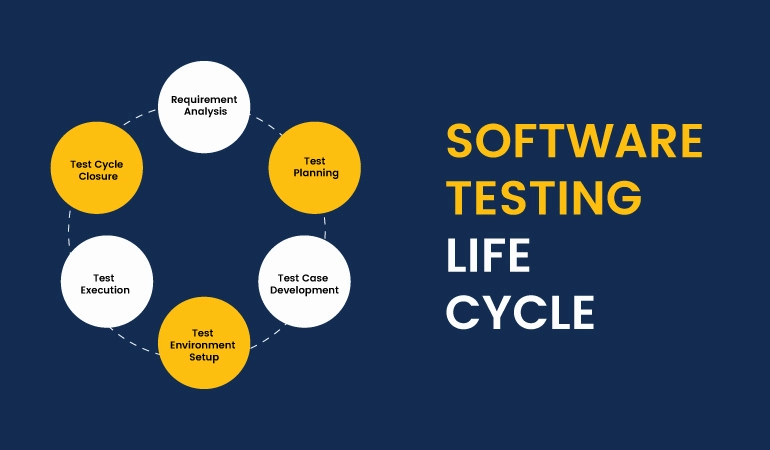
A structured testing lifecycle ensures comprehensive coverage and quality assurance.
- Requirement Analysis
- Test Planning
- Test Case Design
- Test Execution
- Bug Reporting
- Re-testing and Regression Testing
- Test Closure
Tools Used for Android App Testing
- JUnit
- Espresso
- Appium
- Selenium
- Firebase Test Lab
Common Challenges in Android Testing
- Device fragmentation
- Frequent OS updates
- Network variability
- Complex user interactions
Professional QA teams use advanced tools and strategies to overcome these challenges effectively.
Best Practices for Effective Testing

- Start testing early in development
- Use both manual and automated testing
- Test on real devices and emulators
- Perform regular regression testing
- Monitor performance continuously
Benefits of Professional QA Services
| Benefit | Outcome |
|---|---|
| Higher Quality | Reliable and bug-free app |
| Faster Time-to-Market | Efficient testing processes |
| Cost Savings | Reduced post-launch fixes |
| Better User Retention | Improved experience |
Role of Continuous Testing in Agile Development
In modern Agile environments, testing is integrated throughout the development lifecycle. Continuous testing ensures issues are detected early, reducing risks and improving efficiency.
Why Choose Developers App India BM Coder?
Developers App India BM Coder is a trusted software development company offering comprehensive Android app testing and quality assurance services. Our team ensures your app meets the highest standards of performance, security, and usability.
- Experienced QA professionals
- Advanced testing tools
- Comprehensive test coverage
- Fast and reliable delivery
Get Expert Testing for Your Android App
Ensure your app performs flawlessly and delivers an exceptional user experience. Partner with experts who understand the importance of quality assurance.
📧 Email: [email protected]
💬 WhatsApp: +91 9586979730
Conclusion
Testing is the backbone of successful Android applications. It ensures your app is stable, secure, and user-friendly. By investing in a comprehensive testing strategy, businesses can deliver high-quality apps that stand out in the competitive market.
From preventing crashes to enhancing user experience, testing plays a crucial role at every stage of development. Make it a priority and ensure your Android app performs flawlessly in every scenario.
Whether you're launching a new app or improving an existing one, professional testing services can make all the difference in achieving long-term success.
Blog ID: 1382Author: parth
Date: 03-04-2026
We to code. It's our passion










you can also reach us at our given
email address or phone number.